

HyperWrite Review
An AI writing assistant with a browser AI agent layered on top, using TypeAhead inline autocomplete to suggest, draft, and rewrite text across web apps.
Is HyperWrite Worth It?
HyperWrite is worth it for writers who want AI help inside every browser tab, but the Premium plan caps you at 250 AI messages a month. TypeAhead’s inline autocomplete works in almost any text field, and the Personal Assistant browser agent goes further than most AI writing tools by acting on the web. Heavy users will bump into the message cap on Premium and should weigh Ultra’s unlimited allowance.
About HyperWrite
HyperWrite is an AI writing assistant and personal-AI browser agent built by OthersideAI that suggests, drafts, and rewrites text as you work. It draws on multiple large language models and runs as a Chrome extension across web apps and text fields, generating suggestions inside email, documents, and forms without a separate editor window.
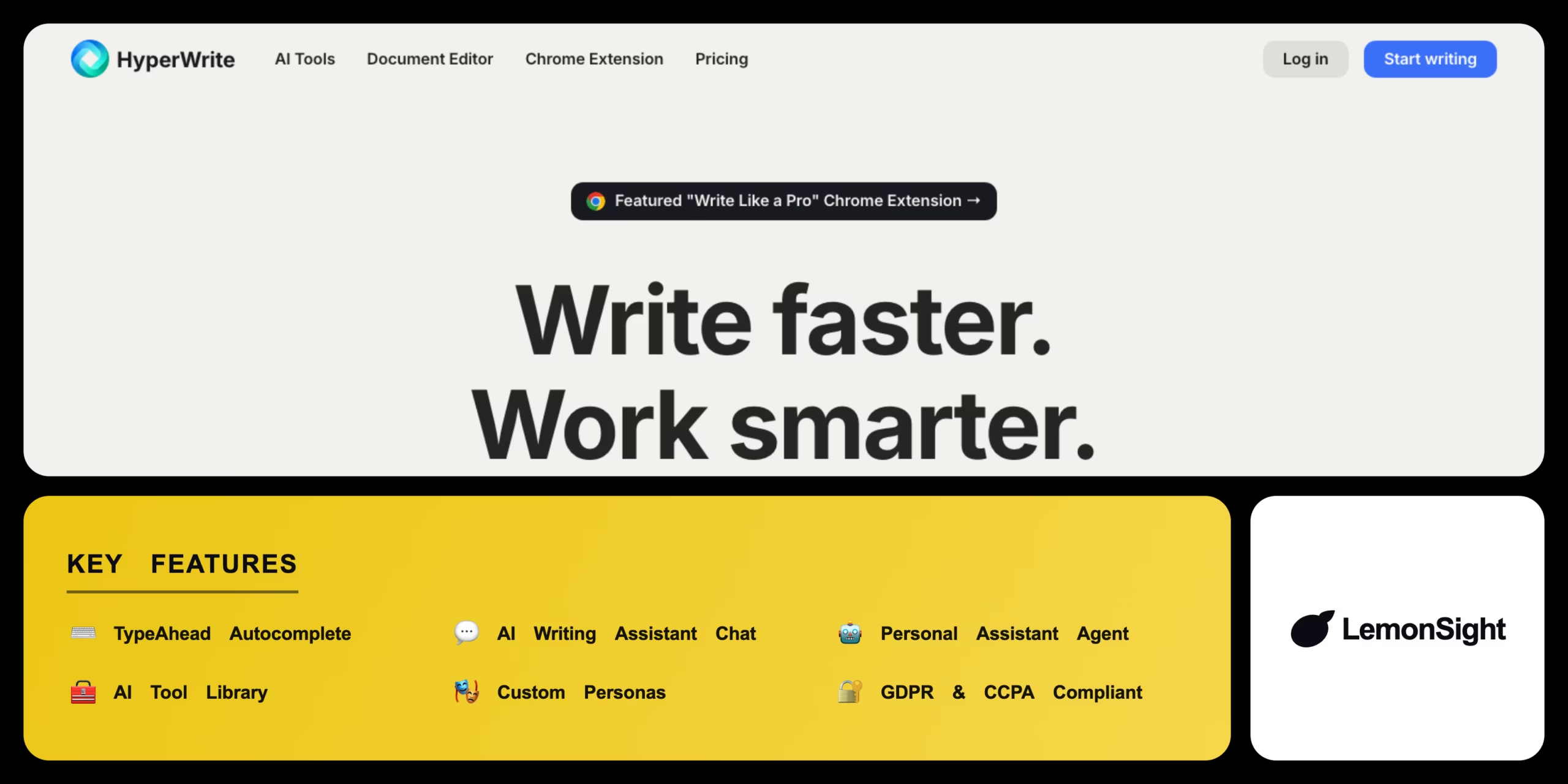
The product comprises four parts: TypeAhead, an inline predictive autocomplete that completes full sentences in any text field; an AI writing assistant chat that drafts, rewrites, and summarizes text on demand; the Personal Assistant, a browser AI agent that navigates websites and fills forms; and a library of hundreds of task-specific AI tools.
Custom Personas let writers train the assistant on their own samples so the tool matches their voice across TypeAhead, chat, and the tool library. HyperWrite gates the Personal Assistant, citations and real-time info, and higher persona counts behind the Premium and Ultra paid tiers.
Is HyperWrite safe and legit?
HyperWrite is safe to use. OthersideAI states that HyperWrite is GDPR- and CCPA-compliant, encrypts data, and does not sell personal information, though no public SOC 2 report is listed. The Personal Assistant is still an early-stage feature and requires confirmation on sensitive actions, so results need review.
Our Verdict
Pros
- Inline TypeAhead across every browser tab
- Browser AI agent for web tasks
- Works everywhere Chrome runs
- Hundreds of task-specific tools
- Custom Personas for voice matching
Cons
- Message caps on Premium
- Agent still early and error-prone
- Long-form drift on extended drafts
- Higher Ultra price than short-form rivals
- No confirmed SOC 2 report
How It Works
Sign up
Sign up for a HyperWrite account.
Confirm email
Confirm your email to complete HyperWrite login.
Choose a plan
Pick the free Starter plan or a paid tier.
Install extension
Install the HyperWrite Chrome extension from the Chrome Web Store.
Sign in
Sign in to the extension with your HyperWrite login.
Start typing
Open the HyperWrite editor or any text field and let TypeAhead suggest text inline.
HyperWrite Features
TypeAhead Autocomplete
Suggests full sentences inline in any browser tab.
AI Writing Assistant Chat
Drafts, rewrites, and summarizes text on demand.
Personal Assistant Agent
Navigates websites and fills forms as a browser AI agent.
AI Tool Library
Runs hundreds of task-specific writing tools.
Custom Personas
Matches your writing style across tools.
HyperWrite Pricing
- Limited TypeAhead suggestions
- Limited AI messages
- Basic tool library access
- Starter-account features only
- $19.99/mo billed monthly
- 250 AI messages/mo
- Unlimited TypeAhead
- 3 Custom Personas
- $44.99/mo billed monthly
- Unlimited AI messages
- Unlimited TypeAhead
- 10 Custom Personas
Who Is HyperWrite Best For?
TypeAhead and an email writer speed up drafting across web apps.
Citations and real-time info add sources to research writing.
The Personal Assistant handles multi-step web tasks during work.
HyperWrite Alternatives
| Tool | Best for | Price | Notes | Compare |
|---|---|---|---|---|
| Jasper | Long-form marketing | $39/mo | No free tier | vs → |
| Rytr | Budget short-form | $7.50/mo annual | Free tier available | vs → |
| Copy.ai | GTM content pipelines | $49/mo | Free tier available | vs → |
| Writesonic | SEO articles | $16/mo | Free tier available | vs → |
| HyperWrite — this review | Inline writing + browser agent | $19.99/mo | Free tier available |
HyperWrite vs Jasper
HyperWrite writes inline across every browser tab through TypeAhead and adds a browser AI agent, while Jasper centers on a long-form editor built for marketing teams and brand voice. Cross-app inline drafting favors HyperWrite; long-form campaign content favors Jasper.
HyperWrite FAQ
Is HyperWrite free?
HyperWrite is free on a limited Starter plan with a small AI message allowance. Premium costs $19.99/mo and Ultra costs $44.99/mo for full access.
How much does HyperWrite cost?
HyperWrite costs $19.99/mo on Premium and $44.99/mo on Ultra when billed monthly, dropping to $16/mo and $29/mo on annual billing.
What is HyperWrite?
HyperWrite is an AI writing assistant and personal AI browser agent that suggests, drafts, and rewrites text through TypeAhead. It’s built by OthersideAI and runs as a Chrome extension.
Is HyperWrite safe?
HyperWrite is safe under OthersideAI’s stated policy, which reports GDPR and CCPA compliance, encryption, and that data is not sold. No public SOC 2 report is listed.
Ready to try HyperWrite?
Start free, or take the trial to explore premium features across all your devices.
Visit HyperWrite →Related Tools

An AI text humanizer that rewrites AI-generated content to bypass detection tools like Turnitin and Originality.ai, with adjustable humanization strength.
A bring-your-own-key AI writing platform with a Story Bible and AI canvas for planning and drafting novels.

An AI content detector and plagiarism checker that scores text originality against major LLMs, with OCR scanning and AI-image/deepfake detection.

An AI writing companion by AI21 Labs that rewrites sentences, adjusts tone, and summarizes documents from a browser overlay.

An AI writing assistant and grammar checker that corrects text, autocompletes sentences, and detects AI-generated content for customer-facing teams.