

Sapling Review
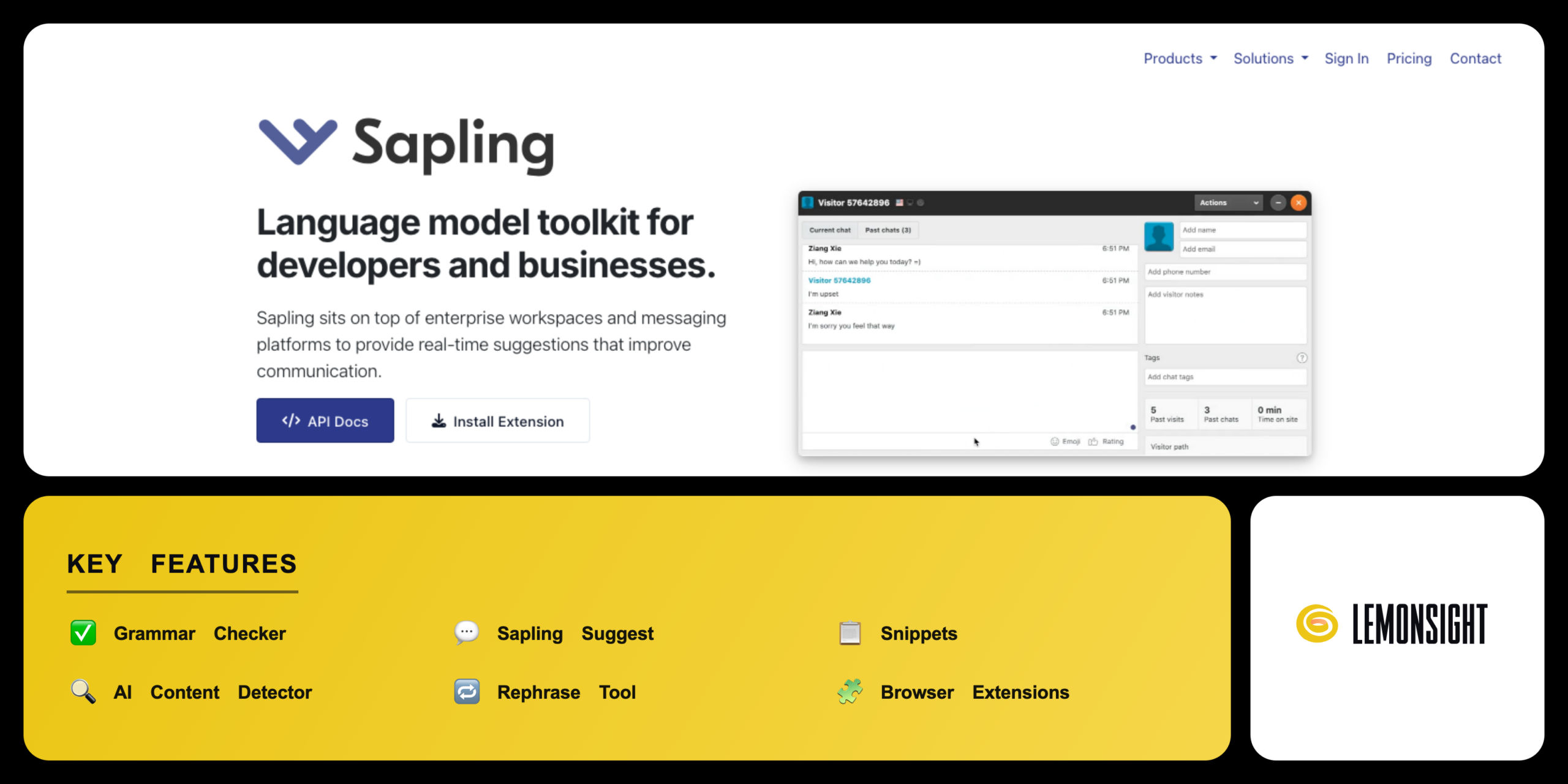
An AI writing assistant and grammar checker that corrects text, autocompletes sentences, and detects AI-generated content for customer-facing teams.
Is Sapling Worth It?
Sapling is worth it for customer-support and sales teams that write high volumes of repetitive replies. Sapling autocompletes sentences, inserts snippets, and checks grammar inside helpdesk and CRM apps. Sapling Pro starts from $12 per month and removes the 20-snippet cap. The free Sapling plan covers everyday grammar and basic suggestions.
About Sapling
Sapling is an AI writing assistant and grammar checker that corrects text, autocompletes sentences, and detects AI-generated content for customer-facing teams. Sapling Intelligence, Inc. operates Sapling from San Francisco, California. Ziang Xie founded Sapling in 2019 after work as a Google engineer. Sapling serves support agents, sales teams, content writers, and developers through a Y Combinator-backed platform.
Sapling bundles several writing tools into one assistant. The grammar checker corrects spelling and punctuation. The Sapling Suggest autocomplete predicts full sentences. The snippets feature inserts saved response templates. The AI content detector flags machine-written text.
Sapling serves three main audiences. Customer support teams use Sapling for fast, consistent replies. Content writers use Sapling for grammar and AI checks. Developers use Sapling through an API for language-model features. Sapling offers a free plan and a paid Pro plan from $12 per month.
Is Sapling safe, private & secure?
Sapling is safe and legitimate, with SOC 2 Type II certification and AES-256 encryption for user content. Sapling encrypts data in transit and at rest. Sapling Intelligence, Inc. operates Sapling under a documented privacy policy.
Security certifications and compliance
Sapling holds SOC 2 Type II certification for security controls and encrypts data with TLS in transit and AES-256 at rest. Sapling complies with HIPAA, PCI, GDPR, and CCPA rules, and offers self-hosted deployment for enterprise data control. Independent external audits confirm the Sapling security controls.
✅ Worth it if you
- Customer-support and sales teams writing high volumes of repetitive replies
- Reply across many web apps like Zendesk, Gmail, and Salesforce in real time
- Want to reduce the time spent typing common responses
- Need team snippets and autocomplete inside helpdesk and CRM apps
🤔 Look elsewhere if you
- Need only an occasional AI detection check
- Rely on the detector for short samples (it flags some human text as AI)
- Work mainly on premium domains (the free plan limits use to non-premium domains)
Our Verdict
Pros
- Real-time sentence autocomplete
- Team snippets across helpdesk apps
- SOC 2 Type II security controls
- Enterprise API and integrations
- Free plan with grammar checking
Cons
- False positives on short human text
- Free plan limited to non-premium domains
- 20-snippet cap on the free plan
- Detector accuracy drops on edited text
- Weaker AI drafting than Grammarly
How It Works
Create account
Visit sapling.ai and create an account with email or Google.
Start trial
Confirm the email to start the free 1-month Pro trial.
Install extension
Install the Sapling browser extension for Chrome, Firefox, or Edge.
Open an app
Open a connected app such as Gmail, Zendesk, or Google Docs.
Type or paste
Type or paste text into the message field.
Review fixes
Review the underlined grammar fixes and accept each suggestion.
Use tools
Insert a snippet or run the AI content detector when needed.
Sapling Features
Grammar Checker
Corrects spelling, punctuation, and grammar in real time.
Sapling Suggest
Autocompletes full sentences from a short opening.
Snippets
Inserts saved response templates with shortcuts.
AI Content Detector
Flags machine-generated text from GPT-5, Claude, and Gemini.
Rephrase Tool
Rewrites a selected sentence for clarity.
Browser Extensions
Runs in Chrome, Firefox, Edge, and Safari.
Helpdesk Integrations
Connects to Zendesk, Salesforce, and Intercom.
Enterprise API
Connects Sapling language models to business apps.
Sapling Pricing
- $25/mo billed monthly
- Autocomplete Everywhere
- Rephrase tool
- Unlimited snippets
- Premium suggestions
- 10-seat minimum
- Team analytics
- Single sign-on & SCIM
- Self-hosted deployment
Who Is Sapling Best For?
Send fast, consistent replies; Sapling Suggest autocompletes answers from a few words; the snippets library inserts approved templates with shortcuts; helpdesk integrations connect to Zendesk and Intercom.
Check grammar and scan for AI text; the grammar checker fixes drafts in real time; the AI content detector reviews text for machine-generated passages; the Rephrase tool rewrites awkward sentences on Pro.
Proofread essays and check originality; the grammar checker corrects spelling and punctuation; the AI content detector scans drafts for AI-generated text; the free plan covers basic grammar checks without a fee.
Sapling Alternatives
| Tool | Best for | Price | Notes | Compare |
|---|---|---|---|---|
| Originality AI | AI detection and plagiarism | $14.95/mo | No free tier | vs → |
| Grammarly | AI writing and tone | from $12/mo | Free tier available | vs → |
| QuillBot | Paraphrasing and rewriting | $4.17/mo | Free tier available | vs → |
| Sapling — this review | Support replies and autocomplete | from $12/mo | Free tier available |
Sapling vs Originality AI
Originality AI focuses on AI detection and plagiarism for publishers, while Sapling focuses on support replies. Originality AI reports a lower false-positive rate than Sapling on edited text, but Sapling adds grammar checking, snippets, and autocomplete that Originality AI lacks. Originality AI starts at $14.95 per month, while Sapling starts from $12 per month.
Sapling FAQ
Is Sapling free?
Sapling offers a free plan with real-time grammar checks, basic suggestions, and 20 snippets on free domains. Autocomplete Everywhere, unlimited snippets, and premium suggestions require a Sapling Pro plan from $12 per month.
Does Sapling have a browser extension?
Sapling has a Chrome extension along with add-ons for Firefox, Microsoft Edge, and Safari. The extensions run grammar checks and insert snippets across Gmail, Zendesk, and other web fields in real time.
Can you use Sapling for team collaboration?
Sapling supports team collaboration through shared snippets that distribute approved reply templates across support desks. Administrators manage the team library, track usage analytics, and set sharing permissions from the dashboard.
Is the Sapling AI detector accurate?
Sapling claims up to 97% detection on clearly AI-generated long-form text. Accuracy drops on short, edited, and humanized text, and the detector flags some human writing as AI, so each score needs human review.
Is Sapling safe to use?
Sapling is safe to use, with SOC 2 Type II certification and AES-256 encryption in transit and at rest. Sapling complies with HIPAA, GDPR, and CCPA. Sapling offers self-hosted deployment for enterprise data control.
Ready to try Sapling?
Start free, or take the trial to explore premium features across all your devices.
Visit Sapling →Related Tools

An AI writing assistant with a browser AI agent layered on top, using TypeAhead inline autocomplete to suggest, draft, and rewrite text across web apps.

An AI text humanizer that rewrites AI-generated content to bypass detection tools like Turnitin and Originality.ai, with adjustable humanization strength.
A bring-your-own-key AI writing platform with a Story Bible and AI canvas for planning and drafting novels.

An AI content detector and plagiarism checker that scores text originality against major LLMs, with OCR scanning and AI-image/deepfake detection.
An AI writing companion by AI21 Labs that rewrites sentences, adjusts tone, and summarizes documents from a browser overlay.