
Vyond Review
A cloud-based drag-and-drop animation platform that produces professional 2D training videos and presentations with automated lip-syncing and AI-drafted scripts.
Is Vyond Worth It?
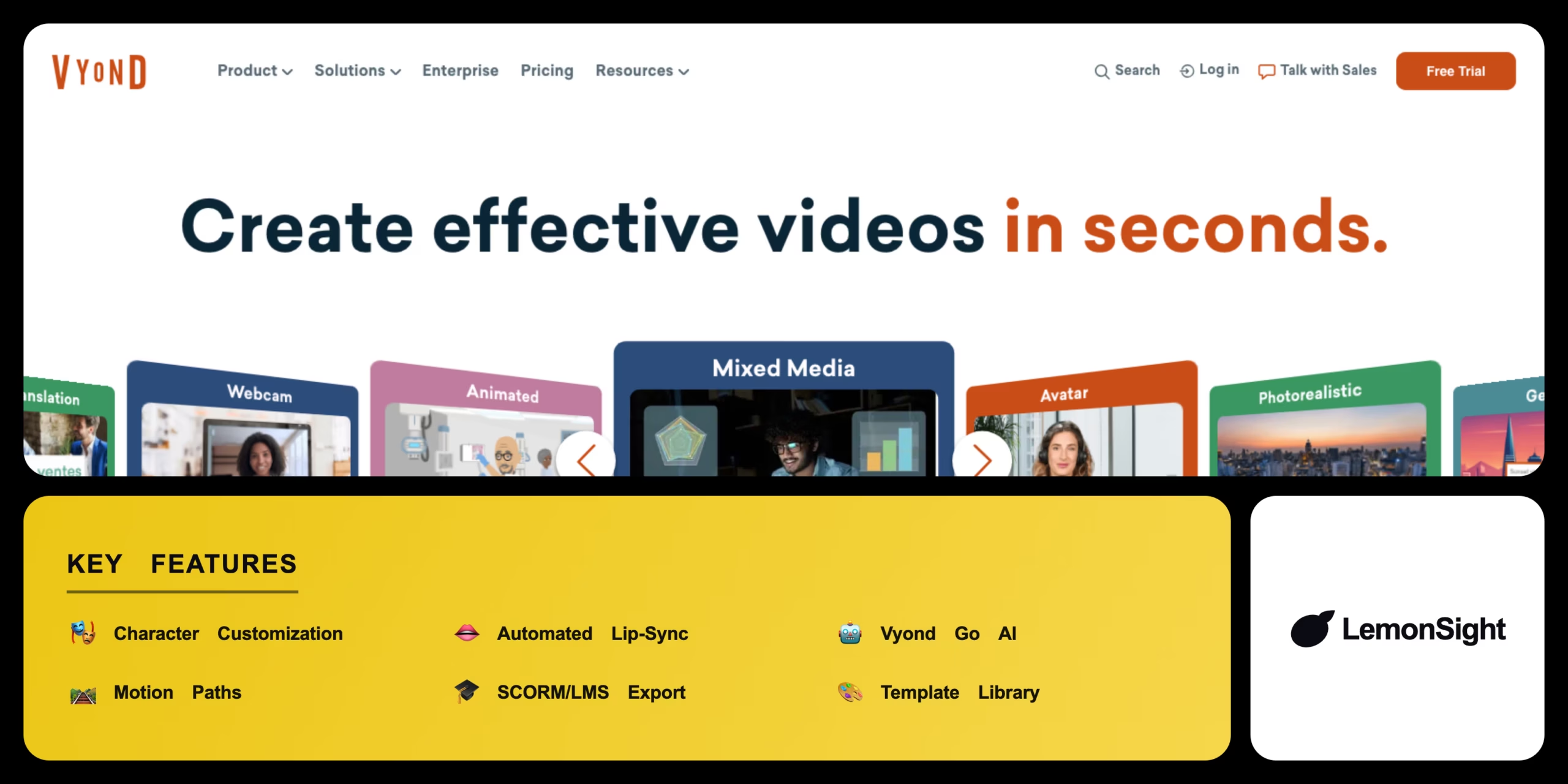
Vyond is worth it for corporate teams that need to produce a steady volume of training or marketing videos in-house. Automated lip-syncing, a massive business-appropriate template library, and Vyond Go AI for generating starting drafts dramatically cut production time and cost versus hiring an agency. There’s no permanent free tier, only a watermarked 14-day trial, and pricing sits well above consumer editors.
About Vyond
Vyond is a cloud-based animation platform that automates the creation of professional 2D videos, presentations, and training materials for corporate teams. It operates via a web browser to provide drag-and-drop video creation without requiring technical animation skills, targeting instructional designers, HR professionals, and marketers producing visual content quickly.
Vyond uses an HTML5 rendering engine for smooth in-browser playback and editing, with an intuitive timeline editor to sequence scenes, lip-sync characters, and apply motion paths automatically. AI-driven text-to-speech generates multilingual voiceovers, Vyond Go (AI) drafts complete videos from text prompts, and SCORM compliance connects with major Learning Management Systems.
Is Vyond safe for enterprise training content?
Vyond is generally safe, prioritizing enterprise security with ISO 27001 certification, single sign-on (SSO), and strict data privacy compliance for corporate clients handling sensitive internal materials.
Our Verdict
Pros
- Massive library of business-appropriate templates
- Automated lip-syncing saves hours of manual work
- Vyond Go AI generates excellent starting drafts
- SCORM compliance for LMS integration
- ISO 27001 certified for enterprise security
Cons
- High pricing barrier for solo creators or hobbyists
- Essential plan places a watermark on exported videos
- No offline editing capabilities
- No permanent free tier, only a 14-day trial
- No native mobile editing apps
How It Works
Log in
Open the Vyond web studio.
Pick a template
Select a pre-built template or blank scene.
Build a character
Use the character creator or a stock character.
Add elements
Drag props, charts, and backgrounds onto the stage.
Add voice
Type dialogue into the text-to-speech engine.
Animate
Assign actions and watch lips sync automatically.
Export
Export as MP4 or GIF for presentations.
Vyond Features
Character Customization
Diverse, business-appropriate avatars.
Automated Lip-Sync
Syncs characters to audio or TTS.
Vyond Go AI
Generates complete video drafts from prompts.
Motion Paths
Moves objects dynamically across the screen.
SCORM/LMS Export
Connects with Learning Management Systems.
Vyond Pricing
- Core template library
- Text-to-speech voiceovers
- Basic export
- 14-day trial
- Vyond Go AI drafting
- No watermark
- Team collaboration
- Commercial export rights
- SCORM/LMS export
- SSO & advanced security
- Priority support
- Shared asset libraries
Who Is Vyond Best For?
Produce polished training videos in-house.
SCORM-compliant courses for any LMS.
Fast, on-brand explainer videos.
Vyond Alternatives
| Tool | Best for | Price | Notes | Compare |
|---|---|---|---|---|
| Powtoon | Simpler presentations | Free + $19/mo | Free tier available | vs → |
| Animaker | Budget social animation | Free + $10/mo | Free tier available | vs → |
| Vyond — this review | Business-grade animation | From $49/mo | 14-day trial |
Vyond vs Powtoon
Powtoon offers a simpler interface focused on animated presentations; Vyond handles more complex character storytelling with automated lip-sync and SCORM/LMS export for corporate training. Simple presentations → Powtoon; complex training content → Vyond.
Vyond FAQ
Is Vyond free?
No. Vyond does not offer a permanent free tier, only a 14-day free trial with a watermark on exports. Paid plans start at $49/month.
Is Vyond accurate?
Vyond’s automated lip-sync and motion paths are generally reliable and consistent once a scene’s audio and characters are set up correctly.
What is Vyond Go?
Vyond Go is Vyond’s AI feature that generates a complete starting video draft from a text prompt, which users then refine in the timeline editor.
Does Vyond work with an LMS?
Yes. Vyond supports SCORM compliance for integration with major Learning Management Systems used in corporate training.
Ready to try Vyond?
Start free, or take the trial to explore premium features across all your devices.
Visit Vyond →Related Tools

A browser-based AI avatar video generator with genuinely free daily credits, watermarked at 720p until you upgrade.

An AI video generation platform that creates video from text prompts or static images, with style transfer and resolution upscaling.
An AI text-to-video and image-to-video generator with Motion Brush, camera controls, and cinematic diffusion models for short-form clips.

Professional video-editing software with AI-assisted timeline editing, color grading, and audio mixing inside Adobe Creative Cloud.

An AI video platform that turns text prompts into fully edited videos with stock media, AI voiceover, and a browser-based timeline editor.

An AI video generator that turns text prompts and still images into short cinematic clips.