

PDFgear Review
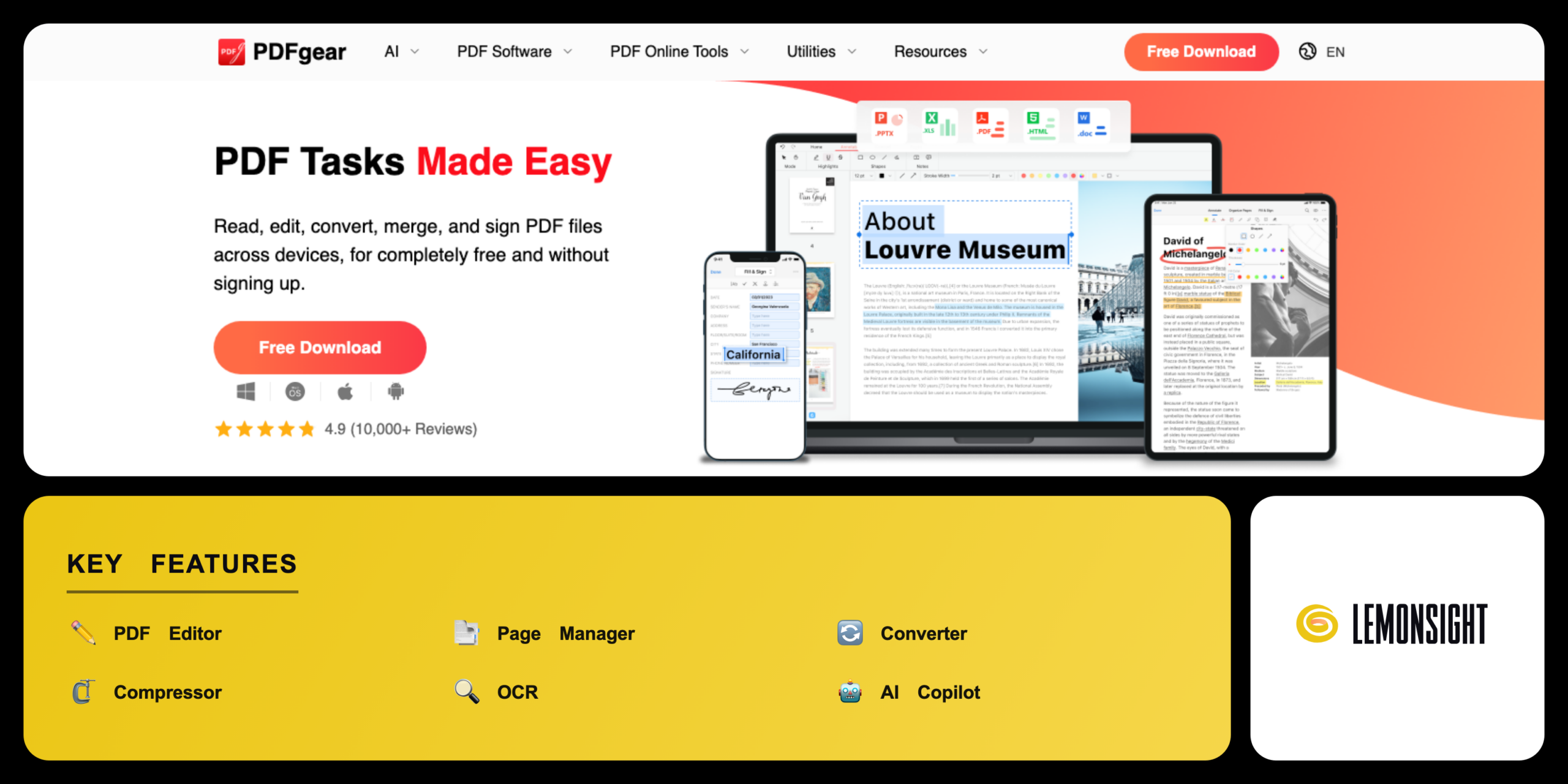
A completely free PDF editor and reader that edits, converts, merges, signs, and reads PDF files with built-in OCR and an AI Copilot.
Is PDFgear Worth It?
PDFgear is worth downloading as a free alternative to Adobe Acrobat. It provides full editing, conversion, compression, and OCR without trial limits, watermarks, or subscription pop-ups, and adds an AI Copilot that summarizes and answers questions on documents. The one open question is long-term cost, since the company plans to charge for some advanced AI and cloud features in the future — but the core desktop editor remains free under the current roadmap.
About PDFgear
PDFgear is a completely free PDF editor and reader that edits, converts, merges, signs, and reads PDF files across desktop and mobile devices. PDF Gear Tech Pte. Ltd. operates PDFgear from Singapore. PDFgear launched in 2022 as a no-cost alternative to Adobe Acrobat. PDFgear charges no subscription fees and adds no watermarks.
PDFgear bundles a full PDF toolkit into one application. The editor changes text, images, and form fields directly inside a document. The converter exchanges PDF files with Word, Excel, PPT, TXT, and JPG. The OCR engine extracts text from scanned PDFs across more than 30 languages. The AI Copilot answers questions and summarizes documents through a built-in chatbot.
PDFgear runs on Windows, macOS, iOS, Android, and the web. PDFgear processes most files locally on the user device rather than on a cloud server. PDFgear requires no account registration to open the full feature set. PDFgear serves students, solo professionals, and document editors who need free editing, OCR text extraction, and conversion tools without trial limits.
Is PDFgear safe, legit & secure?
PDFgear is safe and legitimate for standard document processing, though users should download the installer only from the official website. PDFgear performs file edits locally on the desktop device rather than on a cloud server. PDF Gear Tech Pte. Ltd. operates the application under a published privacy policy.
Antivirus certifications & clean installation record
PDFgear passes antivirus scans with a clean record. The Windows installer returns zero detections across the antivirus engines on VirusTotal and carries a digital signature from the SSL.com EV Code Signing certificate authority. PDFgear reports no verified malware or spyware cases from official downloads, and the AI Copilot sends chat requests to the connected ChatGPT API for language tasks.
✅ Worth it if you
- Need free PDF editing without trial limits or watermarks
- Extract text from scanned PDFs with built-in OCR
- Want an AI Copilot to summarize and query documents
- Edit PDF files often with no account registration
🤔 Look elsewhere if you
- Need certified workflows for a team
- Require published enterprise pricing today
- Prefer an established brand with a long track record
Our Verdict
Pros
- Completely free with no watermark
- Built-in OCR across 30+ languages
- Local desktop file processing
- AI Copilot for summaries and queries
- Runs on Windows, Mac, iOS, Android
Cons
- Future advanced features will cost money
- AI Copilot relies on the ChatGPT API
- No published enterprise pricing yet
- Newer brand with a shorter track record
- Cloud features may require an account later
How It Works
Download
Download PDFgear from the official website at pdfgear.com.
Install
Run the installer and complete the desktop setup.
Open a PDF
Open a PDF file inside the PDFgear workspace.
Pick a tool
Select a tool from the toolbar, such as Edit, Convert, or OCR.
Apply the change
Apply the change and review the result on the page.
Save
Save or export the finished file to the device.
Use AI Copilot
Open the AI Copilot to summarize or query the document.
PDFgear Features
PDF Editor
Edits text, images, links, and form fields.
Page Manager
Merges, splits, reorders, inserts, and deletes pages.
Converter
Exchanges PDF with Word, Excel, PPT, TXT, and JPG.
Compressor
Reduces file size without quality loss.
OCR
Extracts text from scanned PDFs in 30+ languages.
AI Copilot
Summarizes and answers questions on documents.
eSign
Adds handwritten, typed, or image signatures.
Annotation
Highlights, comments, and stamps shapes.
PDFgear Pricing
- Planned AI and cloud features
Who Is PDFgear Best For?
Use OCR to convert scanned papers into editable text, annotate source material, and let the AI Copilot summarize long articles for faster review.
Use eSign to add signatures to contracts, the form builder to create fillable invoices and intake forms, and the compressor to shrink email attachments.
Change text and images in place, reorder, insert, and delete pages with the page manager, and exchange PDF files with Word and Excel.
PDFgear Alternatives
| Tool | Best for | Price | Notes | Compare |
|---|---|---|---|---|
| Adobe Acrobat | Advanced editing and e-sign | $19.99/mo | Trial only | vs → |
| PDF24 | Free online PDF tools | Free | Yes (free tier) | vs → |
| Foxit PDF Editor | Business document teams | $14.99/mo | Trial only | vs → |
| PDFgear — this review | Free desktop editing and AI | Free | Yes (free tier) |
PDFgear vs Adobe Acrobat
Adobe Acrobat charges $19.99 per month for editing, conversion, and e-signature, while PDFgear delivers comparable editing, conversion, and OCR at no cost. Writers who avoid a subscription choose PDFgear, while teams that need certified workflows choose Adobe Acrobat.
PDFgear FAQ
Is PDFgear free?
PDFgear is completely free with no watermarks, no registration requirements, and no feature limits. The free editor includes advanced tools such as OCR text extraction and file conversion at no cost. Users process documents without subscription fees.
How does PDFgear make money?
PDFgear is free to build a brand and grow a user base in a competitive market. PDF Gear Tech Pte. Ltd. funds the application through investment and plans to monetize later through advanced AI and cloud features. Most features remain free under the current model.
Does PDFgear have OCR?
PDFgear includes a built-in OCR tool that extracts text from scanned documents. The character recognition engine supports more than 30 languages. PDFgear converts flat PDF images into editable text on the desktop device.
Who owns PDFgear?
PDF Gear Tech Pte. Ltd. owns PDFgear and registers as a software development company in Singapore. The company maintains development resources for the desktop application, mobile apps, and web-based tools. PDFgear launched in 2022.
Is PDFgear safe?
PDFgear is safe for standard document processing, as the desktop application performs file edits locally on the device. The installer passes antivirus scans and carries a digital signature from a recognized certificate authority. Users download the installer from the official website.
Is PDFgear worth it?
PDFgear is worth downloading as a free alternative to Adobe Acrobat. The application provides editing, compression, OCR, and an AI Copilot without trial limits, watermarks, or subscription pop-ups. Users who need everyday PDF editing at no cost find PDFgear sufficient.
Ready to try PDFgear?
Start free, or take the trial to explore premium features across all your devices.
Visit PDFgear →Related Tools

An AI-powered project management platform that centralizes task tracking, docs, and workflow automation into a single customizable workspace.
An AI meeting assistant whose bot auto-joins video calls to record, transcribe, and summarize them, with an AskFred chat assistant over your meetings.

A cloud-based work operating system with customizable boards for project management, CRM, and team collaboration.

A premium AI email client for Gmail and Outlook that uses keyboard speed and AI drafting to reach inbox zero.

A collaborative visual workspace combining flowcharts, wireframes, mind maps, and docs on one canvas, with AI diagram generation.

A project management and task tracker that coordinates team workflows through list, board, timeline, and portfolio views with custom automation.